
Start at 78°F: Summer Thermostat Settings Homeowners Can Use to Cut Humidity
Set your thermostat to 78°F when you’re home and awake. That’s the baseline the Department of Energy and ENERGY STAR both point to for balancing comfort against your cooling bill. Bump it up 7 to 10 degrees when you leave, ease it back a bit at night, and never shut the AC off completely in humid weather. Skipping that last part invites mold, not savings.
TL;DR:
Raising the thermostat to 85–88°F when away can save 5 to 10% on cooling costs for every 2°F increase, according to utility guidelines.
Maintaining 78°F during home wakefulness and sleep balances comfort and efficiency, especially with ceiling fans or good airflow.
A smart thermostat with learning schedules or geofencing optimizes energy use, but proper sealing and shading are also crucial for reducing heat gain.
If the house struggles to cool below 78°F despite proper scheduling, system issues like old age or refrigerant leaks should be assessed by a professional.
Table of Contents
What Are the Best Thermostat Settings for Summer?
The 78°F number isn’t arbitrary. It’s the point where most Texas households stay comfortable without the compressor running nonstop, and it’s the figure ENERGY STAR’s cooling guidance treats as the anchor setting for the season. Every degree you push above that number chips away at your bill without much complaint from your body, at least up to a point.
Here’s how that plays out across a typical day:
Time of Day | Setting | Why |
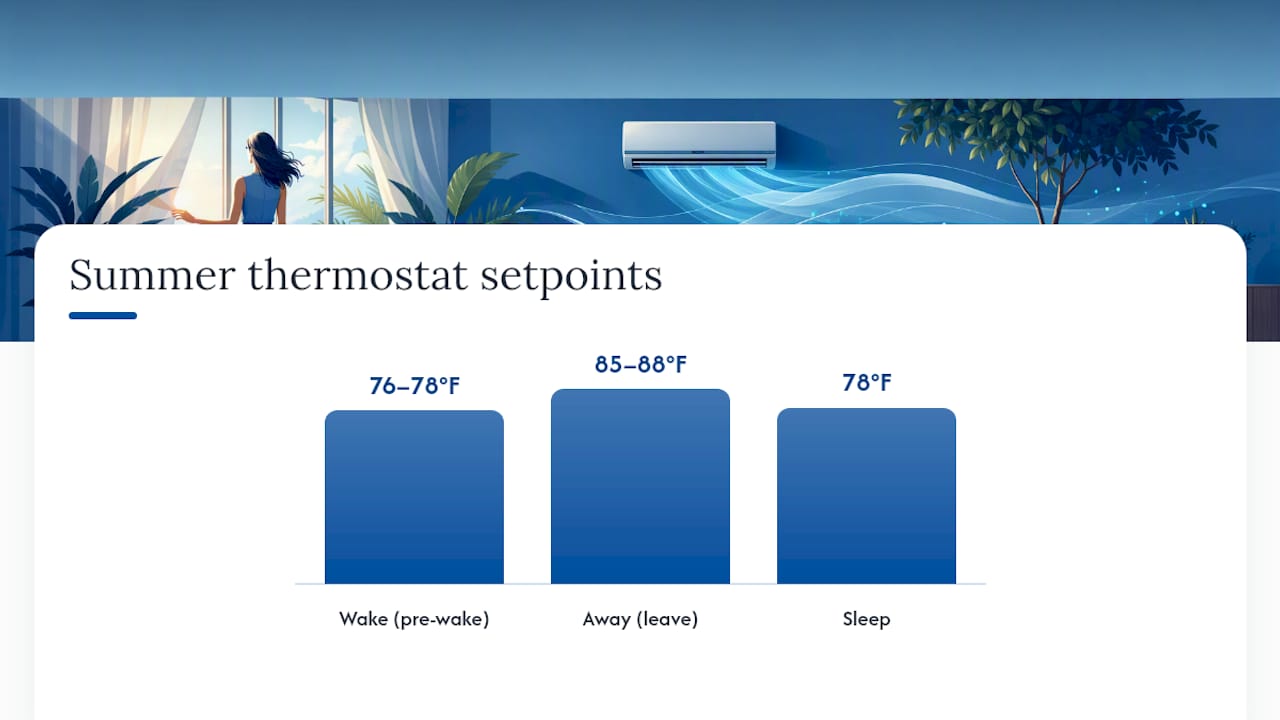
Home, awake | 78°F | ENERGY STAR/DOE baseline for comfort and efficiency |
Away (work, errands) | 85–88°F | No one’s there to notice; avoid “Off” to manage humidity |
Sleeping | 78°F + fan, or 80°F | Bodies run cooler under blankets; airflow substitutes for cold air |
Vacation | 85°F | Keeps AC cycling enough to control moisture |
The math behind the away setting is worth knowing. The Department of Energy estimates roughly 3% savings per degree you raise the setpoint on central air. Utility-side guidance from SMUD backs this up with a simpler rule of thumb: every 2°F you raise the thermostat in summer saves somewhere in the 5 to 10% range on cooling.
A few things to keep in mind as you pick your numbers:
Never set the thermostat to “Off” for extended periods in a humid climate. The compressor pulling moisture out of the air is doing real work.
Sleep setbacks work best paired with a ceiling fan. Air movement lets you tolerate a couple degrees higher without noticing.
Vacation settings should still let the AC cycle occasionally. Full shutdown for a week in July is how homeowners come home to a musty house.
How Do I Build a Summer Thermostat Schedule?
An 8 hour setback during work hours is the single biggest lever most homeowners have, and it costs nothing to set up. The trick is matching your schedule to your actual routine instead of a generic template.
A workable weekday pattern looks like this:
6:00 AM wake: Drop to 76 to 78°F about 30 minutes before you’re up, so the house is comfortable when you start moving.
8:00 AM leave: Raise to 85 to 88°F once the house empties out for work or school.
5:00 PM return: Pre cool starts here if you’re on a time-of-use rate. Bring the temperature down before the 5 to 8 PM peak pricing window hits, not during it.
10:00 PM sleep: Settle at 78°F with the fan running, or step down slightly if your household runs warm.
Programmable thermostats need you to punch in these four blocks once and forget them. Smart thermostats go a step further with geofencing, which uses your phone’s location to start cooling before you’re even in the driveway. That’s the main practical difference: a programmable unit follows the clock, a smart one follows you.
If 78°F feels uncomfortably warm the first week, don’t fight it all at once.
Pro Tip: Raise your setpoint by just 1°F per week instead of jumping straight to 78°F. Households acclimate faster than most people expect, and gradual changes stick better than a sudden shock the whole family rebels against.
Why Does Humidity Matter More Than Temperature?
A house at 78°F and 65% relative humidity feels worse than a house at 80°F and 45% humidity. Moisture in the air blocks your skin from evaporating sweat efficiently, which is the whole mechanism your body uses to cool itself. That’s why chasing a lower setpoint often solves the wrong problem.
Your air conditioner’s compressor is also your primary dehumidifier. Every time it runs, it pulls water vapor out of the air along with heat. The EPA’s guidance on moisture and mold notes that letting indoor humidity climb unchecked raises the risk of mold growth, a problem that shows up fast in Texas summers if the system sits idle too long.
A $15 hygrometer from any hardware store tells you exactly where you stand instead of guessing. If a room consistently reads high even with the AC running, a dehumidifier for that specific space usually beats cranking the thermostat down further.
Keep the fan on Auto, not On, for most homes. Running the fan continuously recirculates moisture the coil just removed, which can make a room feel clammy again within the hour.
If one room stays humid regardless of setpoint, a portable dehumidifier there costs less than overcooling the whole house to compensate.
Which Thermostat Features Actually Matter for Summer?
Not every feature on the box translates to a cooler house or a smaller bill. Some are worth paying for, and some are marketing.
Scheduling and remote access top the list. Consumer Reports’ review of central air settings points out that smart thermostats earn their keep mainly through consistent automation, not exotic sensors, letting you adjust settings from your phone when plans change unexpectedly.
Here’s what genuinely moves the needle:
Learning schedules that adapt to your actual patterns instead of the rigid blocks you programmed manually.
Humidity readouts built into the thermostat display, so you’re not guessing whether 78°F feels sticky or fine.
Multi-sensor support, which matters most in larger homes where one room runs hotter than the thermostat’s location suggests.
Pre-cooling automation for households on time-of-use electricity rates, since it shifts cooling load away from expensive peak hours.
Beyond scheduling, small building fixes support whatever setpoint you land on. Better sealing and shading around doors and windows reduce heat gain before the AC ever has to work, and upgrades like replacing worn interior doors can cut down on the heat transfer between rooms that makes one part of the house feel warmer than the rest.
Pro Tip: If you have a heat pump instead of straight central air, the setback strategy changes. Large setbacks can force the system into inefficient auxiliary heat mode during shoulder seasons, so talk to a technician about smaller, more frequent adjustments instead.
When Should You Call an HVAC Technician?
Most thermostat complaints trace back to something simple. Before assuming your system is failing, run through these checks:
Replace the thermostat batteries if the display is dim or unresponsive.
Check the air filter. A clogged filter restricts airflow enough to make any setpoint feel ineffective.
Inspect vents and returns for furniture or curtains blocking airflow.
Check the breaker panel if the system won’t turn on at all.
If the house still won’t cool evenly after those checks, something mechanical is likely at play. Watch for short cycling (the system turning on and off in quick bursts), persistent high humidity even with the AC running, water pooling near the indoor unit, or unusual grinding or hissing noises. Our guide to fixing thermostat issues and quick checks for an AC that won’t cool walk through more of these symptoms in detail.
Repeated spikes in your cooling bill, a system older than 12 to 15 years, or suspected refrigerant leaks are all signs it’s time for a professional evaluation rather than another DIY fix.
The Real Trade-Off Homeowners Face Every Summer
Comfort, cost, and system longevity pull against each other more than people admit. Crank the setpoint too low and you save nothing while your compressor short cycles itself toward an early replacement. We consistently see homeowners chase a colder house instead of fixing what’s actually driving discomfort, usually humidity or a dirty filter, and end up paying for a new unit they didn’t need. Try the schedule first. Try the simple fixes first. The equipment usually isn’t the problem.
— Dan Patino
Get a Professional Diagnostic Before You Guess Again
A thermostat schedule only works as well as the system behind it. If your AC struggles to hit 78°F even with a clean filter and a sensible schedule, the problem usually isn’t the setpoint. It’s aging equipment, a refrigerant issue, or ductwork losing cooled air before it reaches the room.
A professional technician typically checks the system thoroughly before recommending any replacement. That means refrigerant levels, airflow, electrical connections, and humidity control get evaluated before anyone recommends spending a dollar on new equipment. Some service providers offer maintenance plans that include seasonal inspections to catch small issues before they escalate. If your cooling bill has crept up despite following every setpoint tip here, schedule a diagnostic visit and find out what’s actually driving it.
Where This Guidance Comes From
ENERGY STAR — Heating & Cooling Guide: baseline 78°F setpoint and comfort strategies.
EPA mold and moisture guidance: humidity and mold risk.
Consumer Reports — central air settings: smart thermostat feature value.
EIA — energy use in homes: cooling’s share of household energy use.
Sources
FAQ
Is 77°F a Good Temperature for AC in Summer?
Yes, a temperature close to the 78°F baseline that ENERGY STAR and the DOE recommend works fine for households that run slightly warm-blooded or prefer a touch more comfort for a small energy trade-off.
Is 78°F Too Hot for a House in Summer?
For most people, 78°F feels comfortable when paired with a ceiling fan or good airflow, since moving air lets skin cool more efficiently even at a higher air temperature.
Is 75°F Hot for a House in Summer?
No, a temperature below the standard baseline feels cool to most households, though it costs more to maintain than 78°F over a full season.
How Much Do You Save Raising Your Thermostat in Summer?
Utility guidance from SMUD estimates 5 to 10% savings for every 2°F you raise your cooling setpoint, and the DOE’s 7 to 10°F setback for eight hours can save close to 10% annually.
Recommended
Comments